Google Drive
MiMiNavigator uploads the selected item to a personal Google Drive public folder, applies view permission, and copies the resulting share link. Google Desktop OAuth credentials and Drive API access must be configured first.
 MiMiNavigatorDual-panel file manager for macOS
Cloud sharing for Mac
Select a local item in MiMiNavigator and choose Share+Link from its context menu. The app uploads or copies it to your configured cloud account, creates a view link, and copies that link to the clipboard.
Choose a provider
MiMiNavigator uploads the selected item to a personal Google Drive public folder, applies view permission, and copies the resulting share link. Google Desktop OAuth credentials and Drive API access must be configured first.
MiMiNavigator copies the selected item into the Dropbox Public folder and creates a shared view link. A Dropbox API app with the required sharing permissions and a refresh token must be configured.
Copied to the clipboard
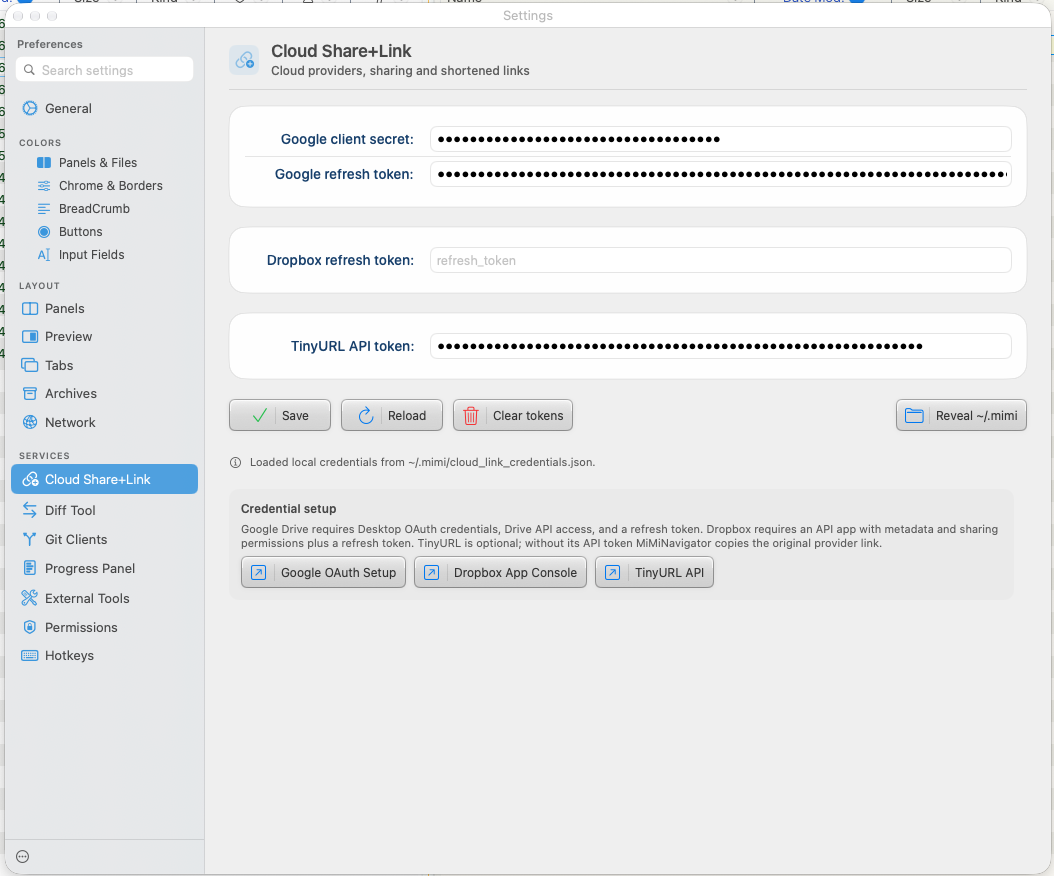
If you configure an optional TinyURL API token, MiMiNavigator creates a mimiNavi short link. If shortening is unavailable or fails, it copies the original Google Drive or Dropbox link instead. The shortener is optional and uses the provider link as its destination.
Setup and access
Share+Link uses your own Google Drive or Dropbox account. Configure the provider's OAuth credentials in Settings → Cloud Share+Link before using it. The feature uploads or copies the selected item into your cloud account so the provider can serve it; review the account's sharing and access settings before distributing a link.
Once configured, start Share+Link from the file context menu. MiMiNavigator handles upload or copy, link creation, and clipboard copying. First-time provider setup and authentication are required.
No. TinyURL shortening is optional. If it is not configured or cannot create a short link, MiMiNavigator copies the original provider link.
The documented Google Drive workflow applies view permission, and Dropbox creates a shared link. Check the provider link settings if you need different access behavior.
MiMiNavigator also includes a Mac media converter and review-first local Cleanup scans with optional on-device AI review.